Showing posts with label Common Core. Show all posts

Tuesday, June 16, 2026

Creating with Technology


Creating, Not Consuming
A Year of Purposeful Technology Integration

⌛ 4 minute read

This school year, technology integration across grades 3–6 continued to focus on purposeful creation, communication, computational thinking, and digital citizenship. As the Digital Learning Specialist, I collaborate with classroom teachers to design and co-teach lessons that integrate meaningful technology experiences into classroom learning.


Students explored a wide range of digital literacy and computer science topics throughout the year, including online safety, digital footprints, privacy, plagiarism, misinformation, deepfakes, AI literacy, responsible technology use, and device distraction.

Students also engaged in computational thinking and coding experiences through Scratch, Sphero, Lego WeDo, Makey Makey, Hour of Code, and Hour of AI activities.


Using Chromebooks within our Google for Education environment, students regularly created and collaborated using Google apps, Canva, WeVideo, and Book Creator. These tools supported authentic student creation through multimedia presentations, digital publishing, coding projects, video production, and collaborative design experiences.

Canva played an especially significant role in supporting graphic design and visual communication skills across grade levels. Students created infographics, posters, awareness campaigns, and presentations connected to classroom curriculum while exploring design principles such as layout, typography, visual hierarchy, color, and audience awareness.


Throughout the year, students were guided by essential technology questions such as:

How can technology support creativity and communication?
What responsibilities do we have as digital citizens?
How can we evaluate the reliability of digital information?
How can computational thinking support problem-solving?
How do design choices influence communication and audience understanding?

These experiences align closely with the Massachusetts DLCS Standards, particularly within the strands of Computing and Society, Digital Tools and Collaboration, Computing Systems, and Computational Thinking.

Across the learning year, technology experiences emphasized creativity, communication, collaboration, and critical thinking in all content areas. Whether students were coding in Scratch, designing projects in Canva, producing green screen videos, or examining topics such as misinformation, deepfakes, and responsible digital citizenship, digital tools were used to support authentic learning, creative expression, and thoughtful problem-solving.

Friday, March 10, 2017

Grade 3 "How To" Videos

Creating "How To" videos using Explain Everything, Drawing Pad and the Camera


Students in Mrs. Holt's grade three classroom recently used the iPad apps, Explain Everything and Drawing Pad, and the iPad camera to create "How To" videos.  Students chose a topic such as, "how to make a sandwich" or "how to play checkers" and then wrote a script of steps that could teach the skill to someone else.  They used Explain Everything, Drawing Pad and the camera to turn their scripts into videos.  Here are a few examples:

How to Paint a Rock Pet
How to Paint Your Nails

Technology Essential Questions:
How does this digital tool help improve collaboration and/or communication?
How can technology be used to enhance a project and communicate knowledge?
How can we use this software to create original, innovative works and ideas?


Grade 3 Common Core Standards: W.3.2, W.3.3, W.3.5, W. 3.6, SL.3.4, SL.3.5, SL.3.6
2016 Massachusetts Digital Literacy and Computer Science (DLCS) Curriculum Framework
3-5.DTC.a.2; 3-5.DTC.a.3; 3-5.DTC.b.1

free glitter text and family website at FamilyLobby.com

Friday, January 6, 2017

Grade 4 Figurative Language: Life is Good!

Students in Ms. Davis' fourth grade have been studying figurative language.  Students created stanzas using figurative language in conjunction with the Life is Good themes.  Here are two examples of stanzas merged together into metaphoric poems about compassion and openness.
Technology Essential Questions:
How does this digital tool help improve collaboration and/or communication?
How can technology be used to enhance a project and communicate knowledge?
How can we use this software to create original, innovative works and ideas?

2016 Massachusetts Digital Literacy and Computer Science (DLCS) Curriculum Framework:
3-5.CAS.b.1, 3-5.DTC.a.3, 3-5.DTC.b.1

Grade 4 Common Core Standards:
L.4.5


free glitter text and family website at FamilyLobby.com

Thursday, June 2, 2016

Ms. Viviani's Social Studies Classes

Digital Postcards from the USA
Students in grade 4 created digital postcards to tell their
friends and family back home all about their virtual trip to a U.S State.
Check it out!
Technology Essential Questions:
How does this digital tool help improve collaboration and/or communication?
How can technology be used to enhance a project and communicate knowledge?
How can we use this software to create original, innovative works and ideas?

Grade 4 Common Core Standards:  RI.4.10; SL.4.4; SL.4.5

free glitter text and family website at FamilyLobby.com

Sunday, May 8, 2016

The American Southwest - Grade 4

Mrs. Viviani's Social Studies Classes
Students have been studying the American Southwest.  As a culminating project, they were tasked with creating an "Explain Everything" screencast to show what they have learned about this incredible region of our country.  Students used print and digital sources to research the topic and presented their findings digitally. 
Check it out!


Technology Essential Questions:
How does this digital tool help improve collaboration and/or communication?
How can technology be used to enhance a project and communicate knowledge?
How can we use this software to create original, innovative works and ideas?

Grade 4 Common Core Standards:  RI.4.10; SL.4.4; SL.4.5
free glitter text and family website at FamilyLobby.com

Grade 4 Explain Everything

Students in Mrs. Macelhiney's grade 4 class were tasked with creating screencasts to explain everything they know about the United States.  Each student researched a U.S. State and
created their tutorials using the iPads and the app, Explain Everything.
Check it out:

Technology Essential Questions:
How does this digital tool help improve collaboration and/or communication?
How can technology be used to enhance a project and communicate knowledge?
How can we use this software to create original, innovative works and ideas?

Grade 4 Common Core Standards:  RI.4.10; SL.4.4; SL.4.5; 
free glitter text and family website at FamilyLobby.com

Wednesday, March 16, 2016

States of Matter - Grade 3

Grade 3 Students in Mrs. Gibson's Class
Topic:  The States of Matter
Grade 3 working hard!
Students used the App Explain Everything to explain the three states of matter.

Check out their finished projects:

Massachusetts Physical Science (Chemistry - Physics) Standards, Grades 3 - 5:
Standard 2:  Compare and contrast solids, liquids, and gases based on the
basic properties of each of these states of matter.
Technology Essential Question:
How can technology be used to enhance a project and communicate knowledge?
free glitter text and family website at FamilyLobby.com

Saturday, January 23, 2016

Online Research and eBook Presentations

Martin Luther King, Jr - by Grade 4
Students were tasked with:
1.  Using Kids InfoBits (online database) to research at least five facts about Martin Luther King, Jr.

2.  Creating online notes and summaries of their research, send to Google Drive

3.  Creating citations for the resources they used, send to Google Drive

4.  Compiling their findings by creating an eBook about M.L.K., Jr. for a young audience
using Book Creator
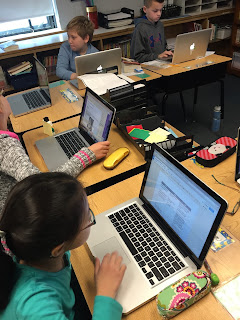
Researching Martin Luther King, Jr

Creating an eBook


Click on images to view finished projects:


Click here for a sample of Research Notes
Click here for a sample of Citations

Common Core Standards for Grade 4:  Reading Informational Text: RI.4; RI.4.9,
Writing:  W.4.2; W.4.4; W.4.7; W.4.8; W.4.9, Language:  L.4.1; L.4.2; L.4.3

Technology Essential Question: How can this technology be used to enhance a project and communicate knowledge?


free glitter text and family website at FamilyLobby.com

Friday, December 4, 2015

Grade 4 and Google Slides

Grade 4
Google Slides and the Global Read Aloud
Students in Ms. Davis's classroom participated in the Global Read Aloud this fall.  The book they read together was Fish in a Tree by Lynda Mullaly Hunt.  Upon completion of the book, students worked together to create a Google Slides presentation of questions and answers about the story.
Check out their work (in progress...)

Common Core Standards:  Grade 4 Language Arts RL.4.1; W.4.4; W.4.6; W.4.9; SL.4.5
MA Technology Literacy Standards: G3-5: 1.19; G3-5: 1.20; G3-5: 1.21; G3-5: 2.1; G3-5: 2.2; G3-5: 2.3


free glitter text and family website at FamilyLobby.com

Wednesday, December 2, 2015

Grade 3
All About The Water Cycle
Creations Made with Book Creator and Drawing Pad
Last week Mrs. Estella's class learned to use two iPad Apps:  Book Creator and Drawing Pad.
Once students knew how to use the App, they were then tasked with creating an eBook about the Water Cycle.  Enjoy a few samples of their efforts....
Earth & Space Science, Grades 3 - 5, Massachusetts Learning Standard 10
Massachusetts Technology Literacy Standards G3 - 5:1.19; 1.20; 1.21; 1.22; 3.9


Technology Essential Question:
How can technology be used to enhance a project and communicate knowledge?


free glitter text and family website at FamilyLobby.com